Structured field merge
Populate insured names, asset identifiers, component sums insured, excess tables, and statutory levy splits directly from the bound quote payload.
Automated schedules of cover, certificates of currency, and tax invoices.
Design your policy schedules and certificates once in our visual template editor. Populate them dynamically with customer, asset, rating, and payment data directly upon binding or endorsement.
Preparing schedules manually in word processors or relying on rigid legacy ledger PDFs introduces transcription mistakes, missing endorsements, and static invoices that cannot embed live payment links. InsureOS populates schedules, certificates, and receipts directly from the structured quote and policy record.
Whether attaching conditional clauses on marine insurance schedules, issuing Certificates of Currency for property policies, or pairing updated schedules with live checkout links on annual policy renewals, every document reflects the exact cover, excess, and levy breakdown calculated by the engine.
Populate insured names, asset identifiers, component sums insured, excess tables, and statutory levy splits directly from the bound quote payload.
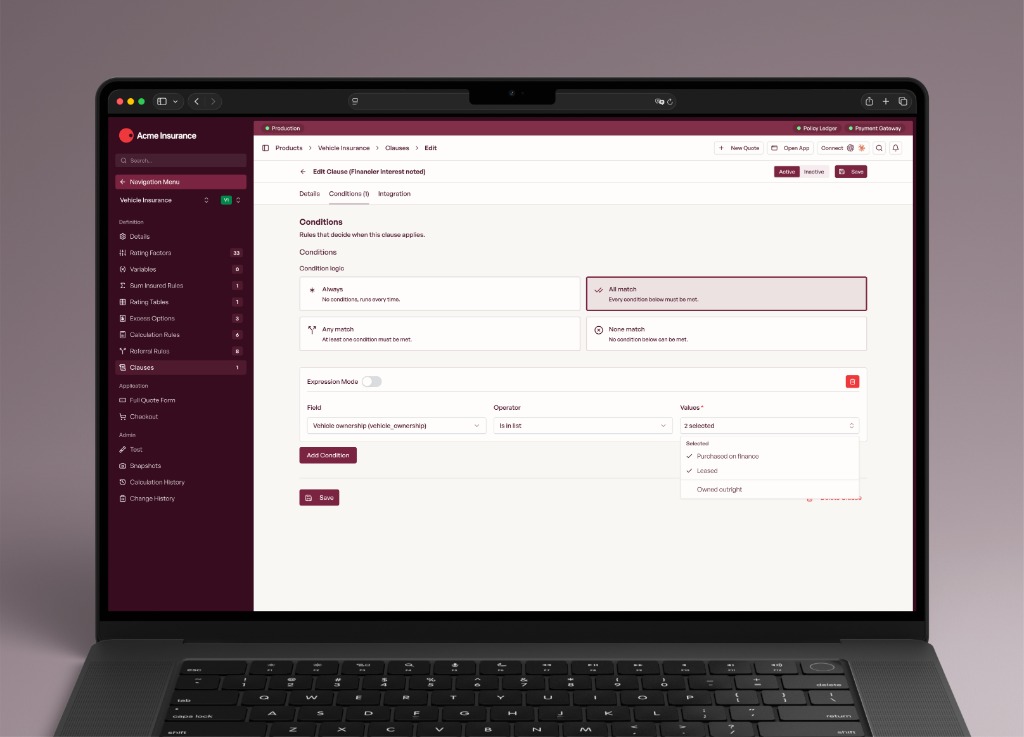
Configure product clauses and optional cover extensions in the portal so the right warranties, endorsements, and wording blocks attach automatically when a risk matches.
Legacy policy systems often cannot inject dynamic checkout URLs into their PDF notices. InsureOS pairs generated documents with live payment links in every customer email.
Generate policy schedules, quote summaries, and Certificates of Currency noting finance companies and interested parties on bind.
Break out net base premium, statutory levies, administration fees, and GST clearly on every customer receipt.
Clauses and extensions are versioned alongside your rating rules so historical quotes always reference the wording active when they were priced.
Because document templates read from the same quote intent and calculation trace that priced the risk, there is never a mismatch between the premium on the checkout screen, the levy split in the ledger, and the schedule emailed to the policyholder.
| Section | Sum insured | Excess |
|---|---|---|
| Hull and machinery | $185,000 | $1,000 |
| Third party liability | $5,000,000 | $500 |
| Personal effects | $10,000 | $250 |
InsureOS generates policy schedules, quote summaries, Certificates of Currency, and itemised tax receipts, and attaches your product wording and policy booklets to automated customer emails.
Underwriters configure clauses and extensions on each product in the portal with condition rules. When a quote matches those conditions, such as noting an interested finance party or selecting an optional cover extension, the clause attaches to the quote and schedule automatically.
You can either generate schedules, certificates, and receipts directly in InsureOS or let your policy administration system remain the document source while InsureOS handles customer email delivery and embeds the live payment link.
Documents are generated and emailed automatically when a quote is saved, when a payment clears, or when a renewal or collections reminder is triggered. Staff can also preview communication templates in the portal before enabling them.
Yes. Every receipt and schedule breaks out the net premium, statutory levies (such as FENZ Fire Service Levies and NHC), company fees, and GST directly from the engine calculation trace.
Yes. Organisation settings and distributor themes allow logos, brand colours, and contact details to adapt per agency or dealer channel while sharing the same underlying product structure.
Online quoting
Embed a real quote-to-bind flow
Automatic rating
Product definitions, rules, tables, explainable factors
Third-party integrations
Plug in the tools you already run
Payment collection
Cards, bank transfers, finance
Conversion tracking
GTM-ready quote events with real premiums
Renewals
Re-rate, payments, automatic renewals
Automation
Webhooks, events, integrations
APIs
Headless when you need it