Automatic rating
A rating engine your underwriting team can audit
Build, price, and version your products without waiting on developer release cycles. Every factor, every loading, and every excess option lives in a structured table you can inspect in the administration console. One source of truth: versioned, explainable, and fully controlled by your underwriters.
See how every dollar of a premium was calculated
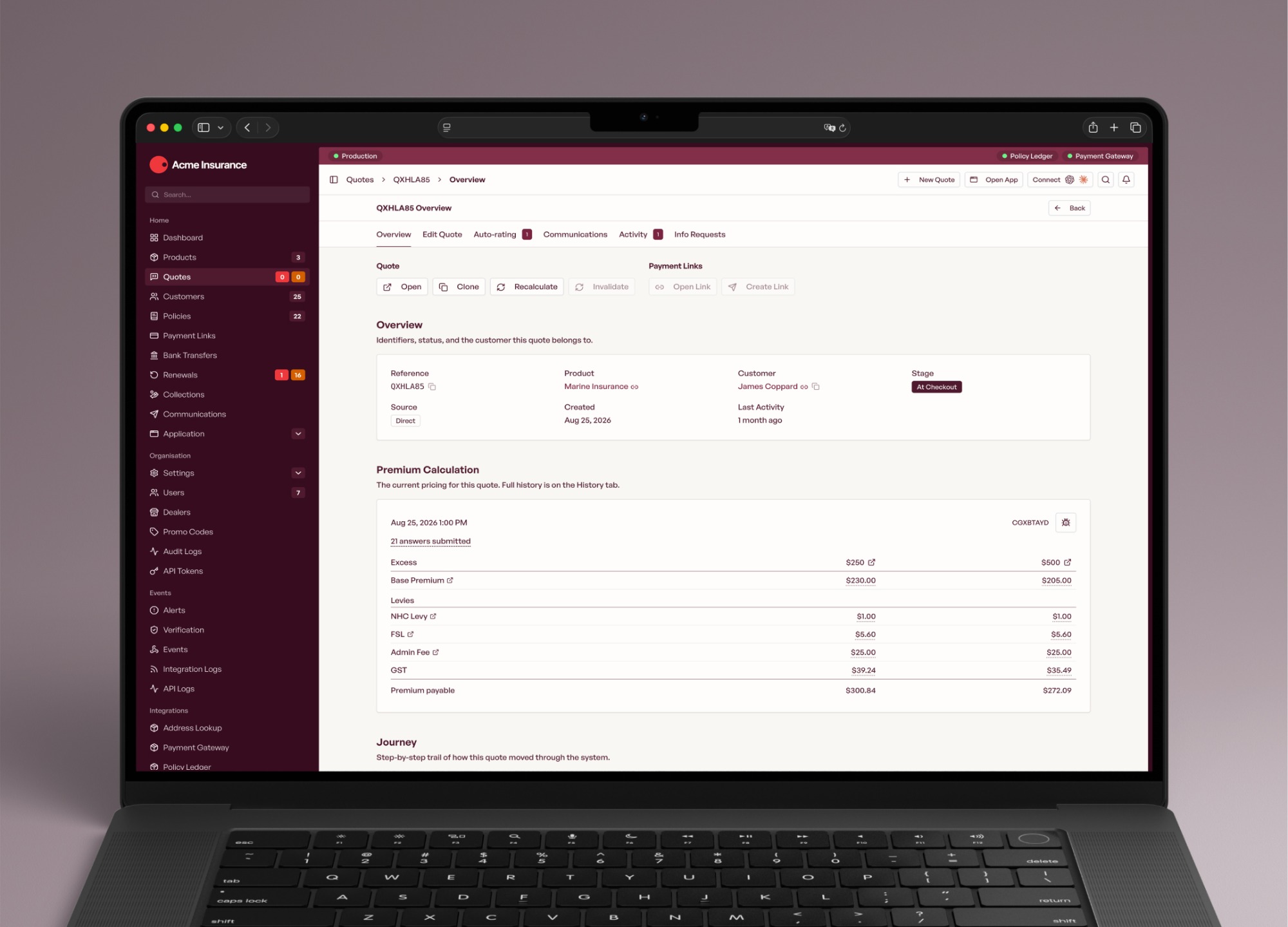
Legacy rating engines bury their pricing inside compiled code, stored procedures, or fragile spreadsheet macros. When a premium looks unexpected, underwriters cannot tell which factor moved the number. As covered in our explainable insurance rating engine guide, InsureOS stores a step-by-step calculation trace with every quote.
Whether pricing sum-insured brackets in property insurance, vessel specifications in marine underwriting, or dealer schemes on the InsureOS platform, underwriters can inspect the exact inputs, table lookups, derived variables, levies, fees, and taxes applied at each stage.
Put underwriting rules into production. Keep every rate change auditable.
Multi-dimensional lookup tables
Structure risk factors, derived variables, and regional brackets into readable grids rather than nested spreadsheet formulas.
Exact decimal arithmetic
Evaluate base premiums, loadings, discounts, statutory levies, policy fees, and GST in ordered stages using fixed-precision decimal maths.
Versioned product snapshots
Publish rate updates when ready while keeping existing open quotes pinned to the exact version that priced them.
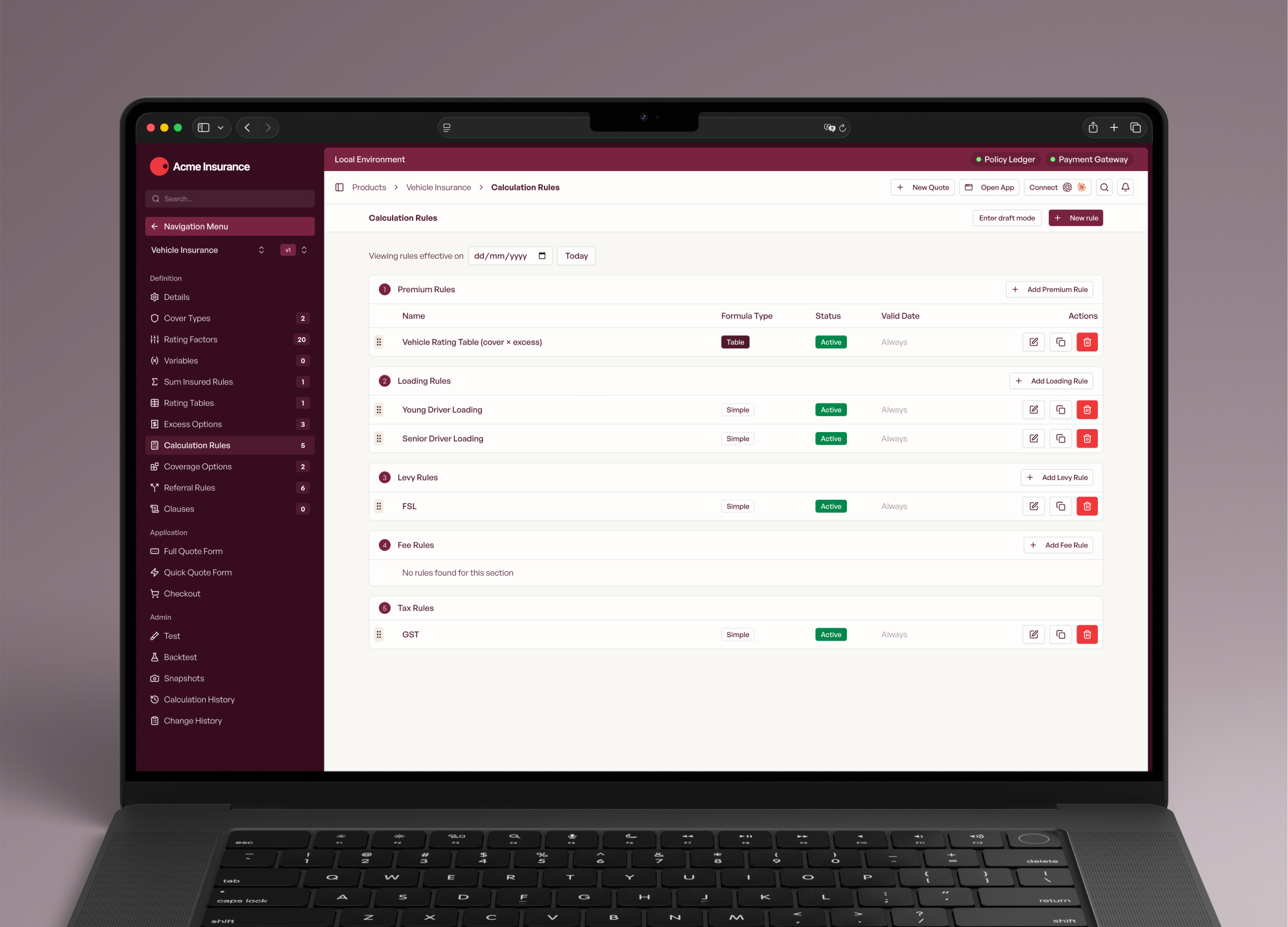
Factors, lookup tables, and ordered calculation stages
Each product is assembled from typed rating factors, derived variables, lookup tables, sum-insured rules, and excess matrices. Ordered calculation rules evaluate base rates, percentage loadings, company fees, statutory levies, and GST without touching application code.
- Multi-dimensional lookup grids and derived intermediate variables
- Dynamic excess options that adjust premium loadings or discounts
- Dedicated calculation stages for statutory levies, administration fees, and taxes
Calculate the base premium using a lookup table or a set of rules.
| $250 | $500 | $1,000 | |
|---|---|---|---|
| $10,000 | $72 | $60 | $51 |
| $20,000 | $144 | $120 | $102 |
| $30,000 | $216 | $180 | $153 |
| $40,000 | $288 | $240 | $204 |
| $50,000 | $360 | $300 | $255 |
Separate underwriter referrals from hard declines
Evaluate boolean condition trees across any risk attribute, sum insured, or applicant disclosure. Standard quotes bind automatically, referred quotes pause for underwriter review or information requests, and out-of-scope risks decline cleanly.
A member of our team will be in touch within 24 hours to complete your quote.
Immutable snapshots tied to every quote
Publishing a product change captures a complete snapshot of every factor, table, excess rule, and formula. Existing unexpired quotes stay pinned to the exact version that priced them, even after new rates go live.
Test sample quotes and inspect every calculation step
Before publishing a rate adjustment, underwriters can run test inputs directly in the portal and inspect the full calculation trace. Every table lookup, derived variable, excess multiplier, levy, and fee is shown line by line.
- Interactive rate tester: enter sample risk values in the portal to verify base rates, loadings, and referral rules immediately.
- Side-by-side excess pricing: see the calculated premium and levy breakdown for every eligible excess option at once.
- Permanent quote audit trail: open any historical quote in the portal to see the exact rule trace that produced the final payable price.
Frequently asked questions about the rating engine
What is an insurance rating engine?
A rating engine is the calculation core that prices insurance risks from applicant inputs, rating factors, lookup tables, excesses, and statutory levies. InsureOS keeps those structures in readable portal tables so underwriting teams can inspect, test, and audit premiums directly.
Can we import our existing underwriting rate sheets?
Yes. We map your existing workbook rate matrices, loading factors, and excess structures into the portal and test sample quotes across both models to verify that every calculated premium matches your signed-off rating sheets.
How are rate changes audited across versions?
Every published product update creates an immutable snapshot recording the factors, lookup tables, and calculation rules active at that point in time. Every quote stays linked to the snapshot that priced it so historical calculations are always reproducible.
Can underwriting teams modify rates without software engineers?
Yes. Authorised underwriters edit lookup tables, loadings, excess options, and referral conditions directly in the portal, verify the results in the interactive rate tester, and publish without a code deployment.
How does the rating engine handle statutory taxes and levies?
Statutory levies and taxes, such as GST and fire or natural hazard levies, run as explicit stages in the calculation pipeline. Every quote stores the separated base premium, company fee, levy, and tax components for reporting.
How does the engine handle multi-component or multi-item risks?
Products can price individual risk sections or repeatable items using component sum-insured rules and derived variables before aggregating them into the total policy premium.
How do automated referral and decline rules work?
Referral and decline rules evaluate boolean condition groups against the quote inputs. Hard declines stop out-of-appetite risks immediately, while referrals pause automated binding and route the quote and its calculation trace to your underwriting team.
How does versioning protect active quotes when rates change?
Each quote is pinned to the product snapshot that priced it. When you publish a new rate version, newly created quotes use the updated snapshot while existing open quotes stay locked to their original version until they bind or expire.
More in solutions
Online quoting
Embed a real quote-to-bind flow
Third-party integrations
Plug in the tools you already run
Payment collection
Cards, bank transfers, finance
Conversion tracking
GTM-ready quote events with real premiums
Renewals
Re-rate, payments, automatic renewals
Document generation
Branded policy docs, certificates, receipts
Automation
Webhooks, events, integrations
APIs
Headless when you need it